Point to the part.
Keep the context.
Annotate AI replies and documents, then send feedback to the original conversation. An unofficial OpenCode plugin with a bundled Rust terminal reviewer.
opencode plugin add @nxxxsooo/opencode-annotate@latest
Requires OpenCode 2.2+. No separate reviewer install.
Start your first review →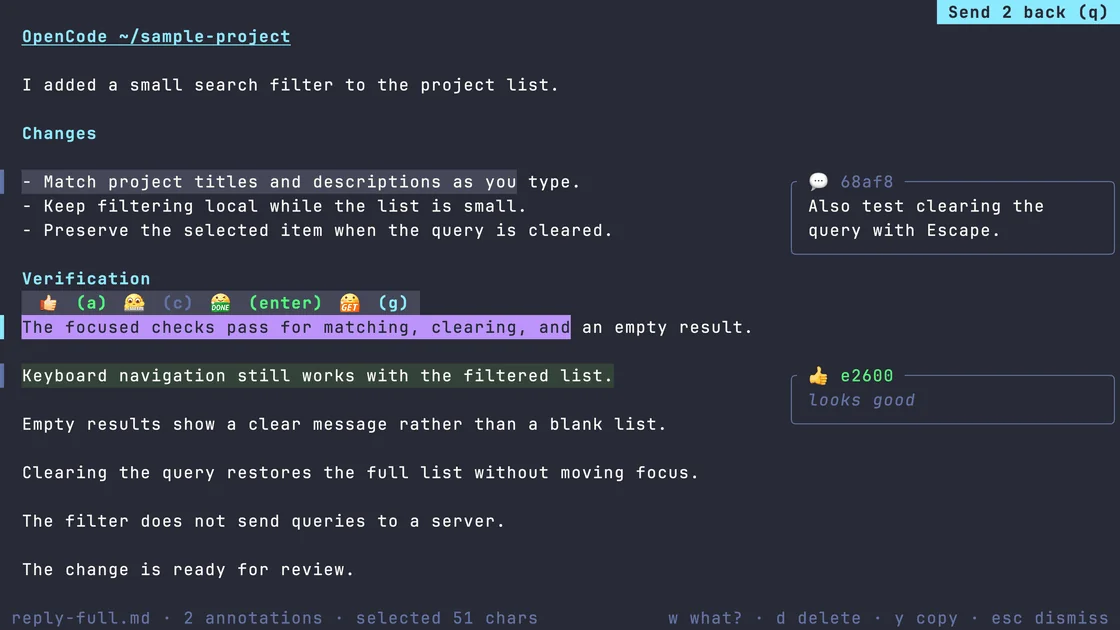
Less re-explaining.
More pointing.
Leave feedback beside the source. The assistant continues when you choose to send.
Open the source
/annotatefor the last completed reply, or/annotate docs/plan.mdfor a local document snapshot. The original file stays untouched.Select and comment
Select a passage, press c to comment, and Enter to save. Your feedback stays attached to what you meant.
Send it back
Press q to send, or Ctrl+S to save the current comment and send. Feedback returns to the originating session, even after a tab switch.
Opening a review makes no model call. Empty and cancelled reviews submit nothing.
For the page
in front of you, too.
The optional Chrome companion lets you select text or a page element, collect notes across pages, and explicitly send the whole round to an OpenCode session you choose through native messaging.
/annotate <url-or-html> opens a page for review. The plugin registers the Chrome native host and your sessions automatically; loading the unpacked extension remains a separate step beyond the plugin install.
The Safari companion copies notes only; it cannot deliver to a session and requires a separate Xcode build.
Browser setup & limitations →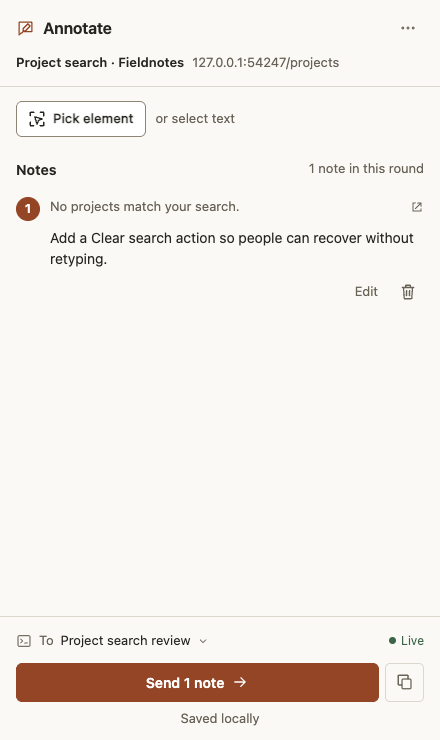
Conversation references moved to another.
/ref left Annotate in 0.16.0. Install another 0.28.0 or later and run another setup to get its cross-agent /ref in OpenCode.
Before you install.
Which platforms are supported?
The plugin requires OpenCode 2.2.0+. Bundled terminal binaries cover macOS arm64/x64, Linux arm64/x64, and Windows x64. OpenCode terminal handoff is verified on macOS; Windows handoff is not yet verified.
What does browser review require?
Browser companions require macOS with Chrome 116+ or Safari 18+. The Chrome native host requires Node 22+, an unpacked extension; the plugin registers the native host automatically. Safari needs an Xcode build and is copy-only. Browser-internal pages, PDFs, cross-origin iframes, Canvas, and remote SSH TUI clients are outside this version’s scope.
How do I update?
Installed copies do not automatically follow each release. Update the plugin below; run /reload if the command list has not refreshed. Browser companions update separately.
opencode plugin update @nxxxsooo/opencode-annotate@latestIs this an official OpenCode product?
No. OpenCode Annotate is an unofficial, open-source plugin under the MIT license.