another / coding agent 会话迁移工具coding agent session migration

去你妈的 Handoff,换就得了。Fuck handoff,
just switch agent.

换个 agent,接着聊。another 把对话文字写进目标 agent 的原生存储,用它自己的命令打开。来源会话保持原样。 Take the conversation with you. another writes your messages into the next agent’s native store and opens them with its own command. Your source session stays untouched.

v0.20.1 · macOS / Linux / Windows · amd64 / arm64 · MIT 开源 v0.20.1 · macOS / Linux / Windows · amd64 / arm64 · MIT licensed

another 的标志与字标:紫色和绿色两个 a 叠在一起,短暂裂成霓虹色通道,随后恢复原样
01 / SWITCH

选会话,选去向,接着干。Pick a session. Pick an agent. Carry on.

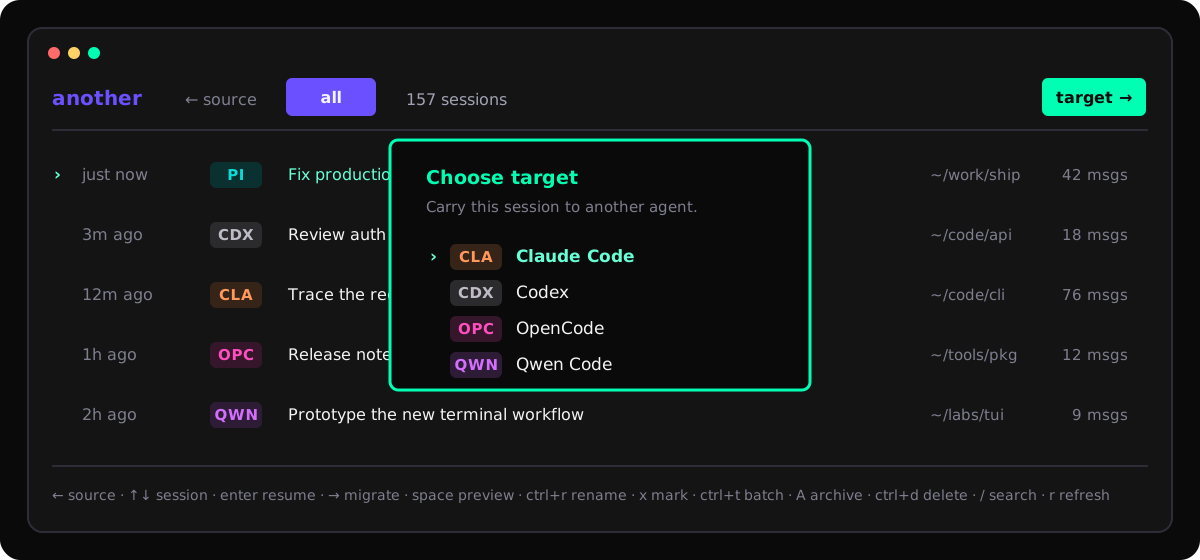
运行 another,在一个列表里找到各家 agent 的会话。选好去向,写入、校验,再用目标 agent 继续。Run another to find your agents’ sessions in one list. Choose a destination, write and verify the conversation, then continue in that agent.

another 的终端界面:来自多个 coding agent 的会话列表与目标 agent 选择器
会话列表 → 目标 agent → 原生恢复命令。小屏可横向滑动查看终端界面。Session list → destination agent → native resume command. Scroll the terminal horizontally on small screens.
native store

搬过去就是它自己的会话It becomes a real session over there

按目标 agent 自己的格式写进去,用它自己的命令打开:codex resume、claude --resume。不是把一大段文字粘进一个新对话。It is written in the target agent's own format and opens with that agent's own command — codex resume, claude --resume. Not a wall of text pasted into a new chat.

verify + rollback

写完自己再读一遍It reads back what it wrote

每次搬完都把写进去的东西重新读出来对一遍,对不上就只删掉这次新建的。原来那边的会话全程一个字都不动。After each move it loads the result back and compares it. If it does not match, it deletes only what this move created. The original session is never touched.

one screen

所有 agent 的会话在一个列表里Every agent's sessions in one list

搜索、预览、改名、归档、删除、换目录、搬到别的 agent,都在这个列表里做完。默认只看当前 Git 项目,按 f 看全部,按 g 按日期或 worktree 分组,按 ? 看完整键表。Search, preview, rename, archive, delete, relocate, move to another agent — all without leaving the list. It starts on the current Git project, f shows everything, g bands the list by date or by worktree, and ? opens the full keymap.

02 / AGENTS

十个 agent,一个入口。Ten agents. One place to start.

Pi、OpenCode、Claude Code、Codex、Antigravity、Qwen Code 进入每次发布的回归检查。CodeM 保留兼容适配并在 setup 中提供;Cursor、CommandCode、Hermes 的适配仍在,已有配置照常可用,但 setup 不再向新用户提供。OpenCode V1 历史和 V2 会话现在共用一个入口,按会话实际存储调用原生操作;旧的 opencode2/o2 别名继续可用。Pi, OpenCode, Claude Code, Codex, Antigravity, and Qwen Code enter every release regression pass. CodeM remains a compatibility adapter offered in setup; Cursor, CommandCode, and Hermes keep their adapters for existing configurations, but setup no longer offers them to new users. OpenCode V1 history and V2 sessions now share one entry, with operations routed to the actual native store; existing opencode2 and o2 aliases still work.

Agent 标记Tag 原生恢复命令Native resume 重命名Rename 归档Archive 迁目录Relocate 删除Delete
PiPIpi --session <file>✓—✓✓
CodexCDXcodex resume <id>✓✓—✓
Claude CodeCLAclaude --resume <id>✓——✓
OpenCodeOPCopencode --session <id>✓V1V2✓
Qwen CodeQWNqwen --resume <id>✓✓—✓
AntigravityAGYagy --conversation <id>✓——✓
CursorCURcursor-agent --resume <id>———✓
CommandCodeCMDcommandcode --resume <id>———✓
CodeMCDMcodem --resume <id>✓✓—✓
HermesHRMhermes --resume <id>—✓—✓

绿色标记的是每次都测的六个。— 表示这个 agent 本身就没有这个操作:改名、归档、删除都是直接改它自己的数据,another 不会另存一份刷新就没的假状态来充数。第一次 setup 也不会因为你机器上装了什么就替你勾上,索引哪些 agent 由你自己选。The green tags are the six that get tested every time. A dash means the agent itself has no such operation: rename, archive, and delete change that agent's own data, and another will not fake one with a marker that vanishes on refresh. First-run setup never ticks agents for you just because the binary is on your machine — you pick what gets indexed.

03 / BOUNDARIES

对话带走,边界说清。Your conversation, with clear boundaries.

搬得过去:按顺序排好的你和 AI 的对话文字、目标格式支持的时间、项目目录、标题,还有一个用来去重和校验的标记。搬不过去:各家自己的推理签名、工具调用和结果、图片、系统记录。这些东西在别家没有对应的形式,硬凑只会凑出假的。Comes along: your messages and the assistant's, in order; timestamps the target format supports; the project directory; the title; and a marker used to deduplicate and verify. Does not: provider-specific reasoning signatures, tool calls and their results, images, and system records. Nothing on the other side matches them, and faking it would just produce something untrue.

校验、删除与本地数据保护Verification, deletion & local data
出错只删这一次新建的If it fails, only the new copy goes校验没过,就把这次新建的那个会话删掉,来源那边原样不动。When the check fails, the session this move created gets deleted. The source is left exactly as it was.
删除默认停在「取消」上Delete starts on Canceld 会先把 provider、标题、项目和完整会话 ID 摆出来,光标默认停在取消;能确认正在跑的会话删不掉。d first shows the provider, title, project, and full session ID, with Cancel selected. Sessions it can positively identify as running are protected.
能真撤销的才给撤销Undo only where undo is realPi 和 Claude Code 的会话就是一个文件,another 把原来的字节留着,按 u 原样写回去:ID、路径、修改时间都不变。OpenCode 2 的删除是它服务端做的,写回去只会多出一个新 ID 的副本,所以那边没有撤销,弹窗会先告诉你现在是哪一种。A Pi or Claude Code session is a single file, so another keeps those exact bytes and u puts them back: same ID, same path, same mtime. OpenCode 2 deletes on its own server, and pushing the conversation back would only create a copy under a new ID, so there is no undo there — the dialog tells you which case you are in before you commit.
本地文件权限收着Local files stay locked down配置目录 0700,配置和 SQLite 索引文件 0600;索引放在 ~/.cache/another/,重新扫描时跳过没变过的会话。The config directory is 0700; the config and SQLite index files are 0600. The index lives in ~/.cache/another/ and skips sessions that have not changed on a re-scan.
重复 ID 对准真实会话Duplicate IDs resolve to the transcript同一会话留在新旧目录时,含真实消息的 transcript 优先于空状态快照,列表标题、路径和消息数会和原生恢复结果一致。When one session remains in old and new directories, the message-bearing transcript wins over an empty state snapshot, so the listed title, path, and count match native resume.
自己不存任何 API keyIt keeps no API keys要起标题时,借用你已经登录好的 agent CLI。在 setup 里关掉某个 agent,只删它在索引里的行,不动它自己的会话。When it needs a title it borrows an agent CLI you already logged into. Turning an agent off in setup only removes its rows from the index, never its own sessions.
another migrate --to codex
# 读来源,写目标,再读回来对一遍read the source, write the target, read it back read claude-code 42 turns write codex native rollout verify digest match source untouched # 上下文模式context modes auto 塞得下就全搬,塞不下只搬最近的all of it if it fits, otherwise just the recent part full 全部对话文字;目标仍可能压缩或拒绝all text; target may compact or reject recent 只搬最近的,有上限only the recent part, with a cap
不只切换:批量命名、agent 集成与 CLIBeyond switching: titles, integrations & CLI

标题按固定格式来,不让模型自由发挥。Titles come out in one fixed shape.

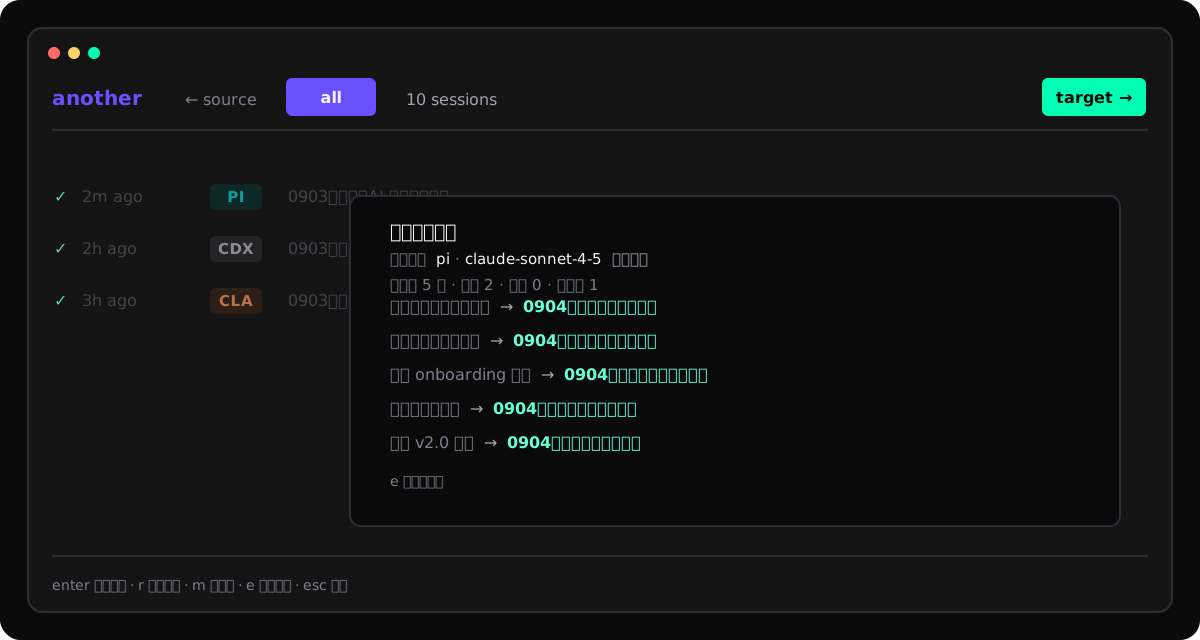
在 setup 里指定一个装好的 agent,按 r 就让它在后台起个标题:中文 MMDD|类型|主题,英文 MMDD|Type|Topic。日期取索引里的创建时间换算成东八区,不让模型猜。格式不对、回得太慢、直接失败的,一律扔掉,不覆盖你已经敲进去的字。Point setup at an agent you already have installed, press r, and it asks that agent for one title in the background: MMDD|类型|主题 in Chinese, MMDD|Type|Topic in English. The date comes from the indexed creation time converted to Asia/Shanghai — the model never guesses it. Anything that comes back in the wrong shape, too late, or not at all gets thrown away without touching what you typed.

another 的批量命名确认页:原标题到新标题的对照表与折叠计数
按 x 挑几条,r 一起改名。确认页只列会变的那几行,锁住的、失败的、没变的折成一个数字;真正写进去时一行行读回来对。Tick a few with x, rename them together with r. The review page only lists rows that would actually change; frozen, failed, and unchanged ones fold into a count, and each row is read back as it's applied.
模型列表问 CLI 自己要The model list comes from the CLI itself能列模型的 agent,就用它自己的命令列(pi --list-models、agy models、opencode models);不能列的直接让你手输,并说明为什么。If an agent can list its models, another asks it (pi --list-models, agy models, opencode models). If it can't, you type the model in, and it tells you why.
起标题留下的垃圾会话不进列表Junk sessions from naming stay out有几个 CLI 每跑一次后台调用就自己记一条会话。another 靠固定的提示词首行和 another-titler-* 临时目录认出它们,挡在自己的索引外,只清自己的索引,不删人家的文件。A few CLIs record a session for every background run. another spots them by the prompt's fixed first line and the another-titler-* throwaway directory and keeps them out of its own index — its index only, nobody's files get deleted.
OpenCode 首次命名就带日期OpenCode dates the first titleOpenCode 2.0.4 的标题插件在首次保存标题前写入创建日期,不再等重命名事件补日期。升级 another 后运行 another integrations install opencode 更新已装插件;已有标题不追改。插件只写 plugins/another-title-policy/。On OpenCode 2.0.4, the title plugin adds the creation date before the first title is saved, instead of waiting for a rename event. After upgrading another, run another integrations install opencode to refresh the plugin; existing titles stay unchanged. It only writes plugins/another-title-policy/.
Pi 一轮结束就补上名字Pi gets named when a turn ends同样带在二进制里的扩展装进 ~/.pi/agent/extensions/another-title-policy/,在 agent_end 时回头喊 another 来起名。它自己不接模型,所以规则只有一份;你改过标题的会话会跳过。An extension ships inside the binary the same way, installs into ~/.pi/agent/extensions/another-title-policy/, and calls another back on agent_end. It talks to no model of its own, so the rule exists once, and a session you titled yourself is skipped.
Claude Code 的会话结束后补名字Claude Code gets named on the way out一个 SessionEnd hook 在会话结束后调 another rename --auto,在后台按同一套规则起名;你自己改过标题的会跳过。这个 hook 要你自己写进 ~/.claude/settings.json,another 不替你改配置。A SessionEnd hook calls another rename --auto once the session is over and names it in the background under the same rule; sessions you titled yourself are skipped. You add that hook to ~/.claude/settings.json yourself — another doesn't edit your config.
another --help
# 浏览和搜索browse and search another list --provider codex --cwd --json another search "stripe webhook" # 搬到另一个 agentmove a session another migrate <id> --to pi -y another resume <id> --to claude-code # 改名,改的是 agent 自己存的标题rename, in the agent's own title store another rename <id> --auto # 可移植备份portable backup another export <id> -o session.another.json another import session.another.json --to codex # 配置和索引config and index another setup another providers doctor # 更新自己,走当初装它的那条路update itself, through whatever installed it another update # 把标题适配器装进 agent 自己的目录install the title adapter into the agent's own directory another integrations install pi
04 / INSTALL

下一段对话,换个地方继续。Give the next turn a new home.

支持 macOS、Linux 和 Windows(amd64 / arm64)。Windows 使用顶部的 PowerShell 安装命令。首次运行进入 setup,手动选择要索引的 agent。Windows 实机已验证 setup、索引、预览和 Codex 交接,其他 agent 的 Windows 原生交接仍待实测。Runs on macOS, Linux, and Windows (amd64 and arm64). Use the PowerShell install tab for Windows. First-run setup asks you to choose which agents to index. Windows VM checks cover setup, indexing, preview, and Codex handoff; native Windows handoff for other agents remains unverified.

v0.20.1 让切换视图时列表保持不动:按 g 在不分组、按日期、按目录之间切换,任何一列都不移动;按 t 也不再改变顶栏宽度,没有时间窗时显示「全部时间」。v0.20.0 把常用键挪到单个字母(r 重命名、d 删除、s 刷新,原来的 Ctrl 组合键仍可用),/ 支持 path:目录,手机宽度的终端里每行把宽度让给标题。运行 another update 升级。v0.20.1 keeps the list still while you change the view: g switches between ungrouped, by date, and by directory without moving a single column, and t no longer reshapes the header, which now says all time when no window is set. v0.20.0 put the everyday keys on single letters (r rename, d delete, s refresh; the Ctrl keys still work), added path:folder to /, and gave phone-width terminals rows that show the title. Run another update to upgrade.

HomebrewHomebrew

Homebrew 6 要先信任第三方 tap 才肯装。旧版 Homebrew 不认识 brew trust,第一行跳过就行。Homebrew 6 won't touch a third-party tap until you trust it. Older Homebrew doesn't know brew trust — just skip the first line.

brew trust nxxxsooo/tap brew install nxxxsooo/tap/another another
快捷启动Shell shortcuts空闲时添加 a → another,已有同名命令、函数或 alias 就跳过。脚本安装时添加,Homebrew 在首次交互运行时添加,重开 shell 生效。开发版 make install 添加 a-dev 和 adev。Adds a → another only when the name is free. Existing commands, functions, and aliases win. Scripts add it during installation; Homebrew adds it on the first interactive launch. Open a new shell afterwards. Development installs add a-dev and adev.
连续归档Continuous archivingTUI 内 a 始终归档当前会话,u 撤销最近一次归档或可恢复的删除,Esc 关闭撤销提示,q 退出。Inside the TUI, a always archives the current session. u undoes the latest archive or reversible delete, Esc dismisses the offer, and q quits.
从源码From sourcego install github.com/nxxxsooo/another/cmd/another@latest,需要 Go 1.24 或更高版本。 — requires Go 1.24 or newer.
手动下载Manual download从 Releases 拿对应的压缩包(Windows 为 ZIP),用 checksums.txt 校验,再把二进制放进 PATH。Grab the matching archive from Releases (ZIP on Windows), verify it against checksums.txt, and put the binary on your PATH.
更新Updatesbrew upgrade another,或者直接 another update,它会走你当初装它的那条路。装好的二进制不会自己跟着仓库变。, or just another update, which follows whatever installed it. An installed binary never updates itself behind your back.

换个 agent,不用重讲一遍。Change the agent without starting over.

全程在你自己机器上跑,读的是各家 agent 自己的存储。MIT 协议,代码都在 GitHub 上。It all runs on your machine, reading each agent's own store. MIT licensed, code's on GitHub.

another 退出时打印的字标:一份紫色、一份薄荷绿的字标从两边靠拢,途中撕成错位的横条,最后重合成一个青绿色字标
退出的时候,它会这样跟你告别。This is how it says goodbye when you quit.