
Asia/Shanghai
March 5, 2026

After OpenCode, OpenClaw Feels Brain-Dead

用惯了 OpenCode,OpenClaw 真降智

Mingjian Shao
After OpenCode, OpenClaw Feels Brain-Dead
Everyone's raving about OpenClaw. I actually installed it, configured it, and used it. The gap between the hype and reality is embarrassing.
Open Twitter. Open Reddit. Open any AI newsletter. You'll see OpenClaw everywhere."OpenClaw changed how I work." "My personal AI assistant runs 24/7." "229k stars on GitHub — the fastest growing AI project of 2026."The articles all read the same: install in 10 minutes, connect to Telegram, and suddenly you have a personal AI that remembers everything and does everything. The comment sections are full of people who've never used it telling other people who've never used it how amazing it is.I decided to actually try it. Here's what happened.
Strip away the marketing and OpenClaw is three things:
  • A Telegram bot framework — it connects LLMs to messaging apps
  • An LLM gateway — it routes requests to different AI providers
  • A skill plugin system — it can run predefined automation scripts
That's it. It's a chat relay with plugins.It is NOT:
  • A coding assistant (no LSP, no codebase awareness, no inline edits)
  • A multi-agent system (no sub-agent orchestration, no parallel task execution)
  • A productivity tool for developers (one session per agent — yes, really)
Bash
brew install --cask openclaw        # macOS app
curl -fsSL https://openclaw.ai/install.sh | bash  # CLI + gateway
Two commands, five minutes. Credit where it's due — the installation is smooth.OpenClaw uses a JSON config file at ~/.openclaw/openclaw.json. Here's where I configured three LLM providers (Anthropic relay, Volcengine Ark, DashScope Qwen):
Json
{
  "models": {
    "providers": {
      "cc-relay": { "baseUrl": "...", "models": [...] },
      "ark": { "baseUrl": "...", "models": [...] },
      "qwen": { "baseUrl": "...", "models": [...] }
    }
  }
}
Straightforward — similar to any OpenAI-compatible config. No complaints here.Here's the first surprise. The macOS app is just a UI shell. It does nothing on its own. You need a gateway process running in the background:
Text
┌─────────────┐     WebSocket      ┌──────────────┐
│  GUI / TUI  │ ◄────────────────► │   Gateway    │ → LLM APIs
│  (just UI)  │  ws://127.0.0.1    │  (node.js)   │ → Telegram
└─────────────┘     :18789         └──────────────┘
The gateway is a Node.js process managed via launchd. When I first opened the app after installing, I got:
Error: gateway connect: connect to gateway @ ws://127.0.0.1:18789: Could not connect to the server.
Because nobody told me I needed to run openclaw gateway install --force separately. The "10-minute setup" articles conveniently skip this part.OpenClaw's memory system reads Markdown files from a workspace directory, embeds them with a local model, and stores vectors in SQLite. Sounds reasonable — until you try to configure it.
  • Provider must be one of: openai, local, gemini, voyage, mistral, ollama
  • I have LMStudio running with embedding models. LMStudio isn't an option.
  • "ollama" accepts a model name but doesn't let you set a custom base URL
  • "local" downloads a 328MB GGUF model automatically (embeddinggemma-300m)
Eventually local worked. But "it just works" it is not.
This is the part that made me close the app.I clicked around the Canvas web UI (which is actually nice-looking), found the Chat page, and started a conversation. Then I wanted to start a fresh conversation about a different topic.I looked for a "New Chat" button. Found it. Clicked it. Nothing happened. Went to the Sessions page:
Text
Sessions listed: 1
Kind   Key                  Model          Tokens
direct agent:main:main      qwen3.5-plus   unknown/1000k
One session. That's all you get. One agent, one conversation thread, forever. There's no multi-session, no branching, no parallel conversations.Every AI chat product since 2023 has had multiple conversations. ChatGPT has it. Claude has it. Even local tools like OpenCode have it. OpenClaw in 2026? One thread.The designed workflow is: talk to your one agent, let compaction handle context overflow, and use memory search to recall old topics. It's the Telegram bot mindset — one chat, forever scrolling.
Let's be specific about what works and what doesn't:
FeatureReality
Multi-provider LLM routing✅ Works well
Telegram/Discord integration✅ The actual use case
Skill plugins✅ Decent ecosystem
Canvas web UI✅ Looks good
Memory search⚠️ Works after painful setup
Multi-session conversations❌ Doesn't exist
Coding assistance❌ No LSP, no codebase awareness
Sub-agent orchestration❌ No parallel agents
File editing capabilities❌ Basic at best
The reality is: "A nice way to talk to Claude/GPT from your phone via Telegram, with plugins."That's a real product with real value — for non-developers who want a personal AI chatbot on their phone. But that's not what the hype articles say. They position it as a developer productivity revolution, which it absolutely is not.
Every OpenClaw article follows the same template:
  • "I installed OpenClaw and it changed my life" (they installed it yesterday)
  • "It's like having a personal AI assistant" (so is ChatGPT, for free)
  • "229k GitHub stars prove it's the best" (stars prove marketing, not quality)
  • "Here are 10 skills that will blow your mind" (lists things any LLM can do)
  • "Zero to first chat in 10 minutes" (ignoring the gateway, memory, and config issues)
The authors are mostly content creators who write about AI tools for engagement. They're not using OpenClaw daily for real work. They installed it, sent one message, took a screenshot, and wrote 2000 words about the future of AI agents.
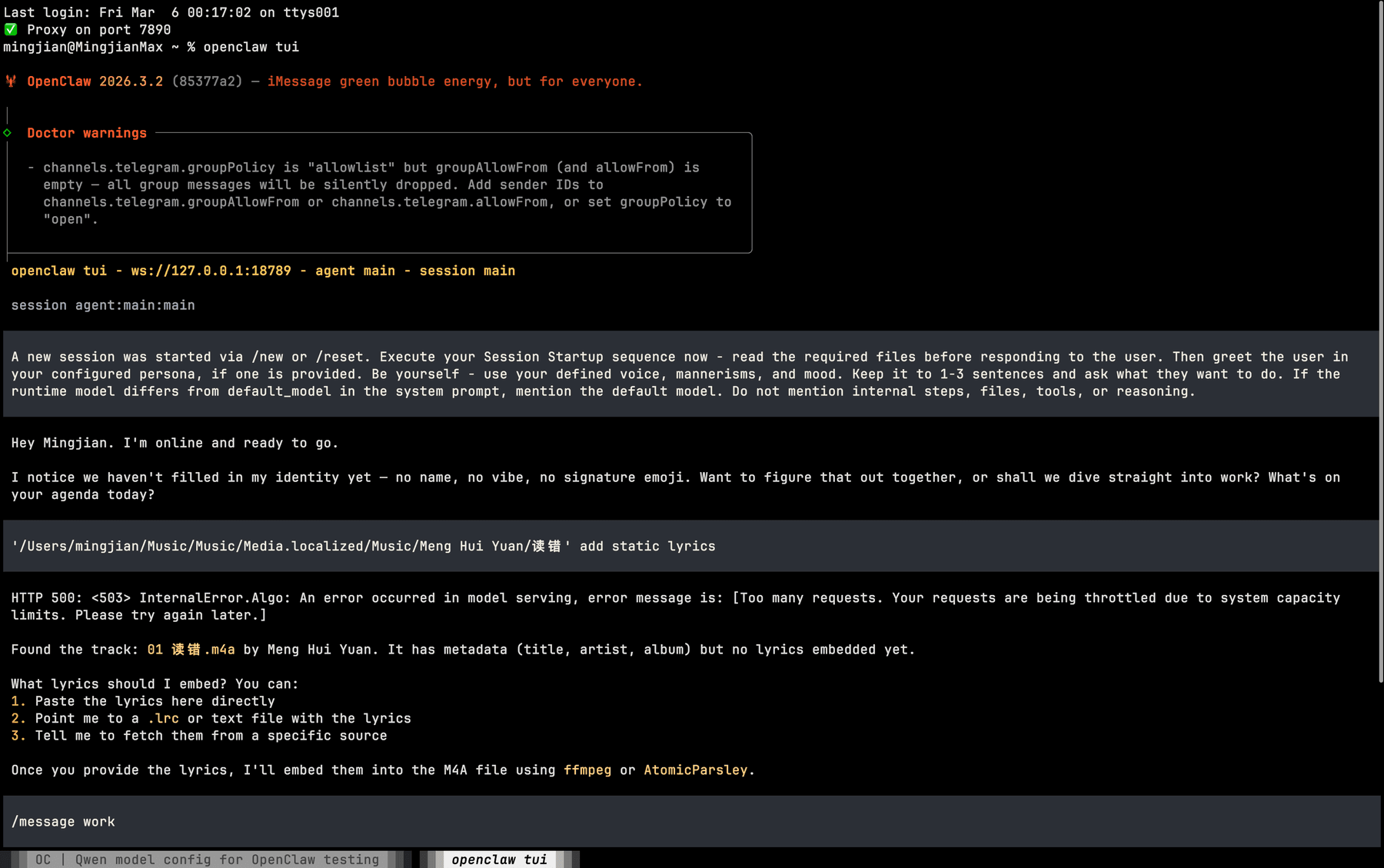
Forget coding — let's try something trivial. I asked both tools to embed lyrics into an M4A music file (Meng Hui Yuan's 渡舟). This should be a 2-minute task: find the lyrics, run AtomicParsley, done.OpenClaw's response:
OpenClaw stuck asking how to provide lyrics
It found the track metadata, then... asked me how I wanted to provide the lyrics. Paste them? Point to an .lrc file? Fetch from a source? It couldn't decide on its own. It just sat there, waiting for hand-holding.OpenCode's response:
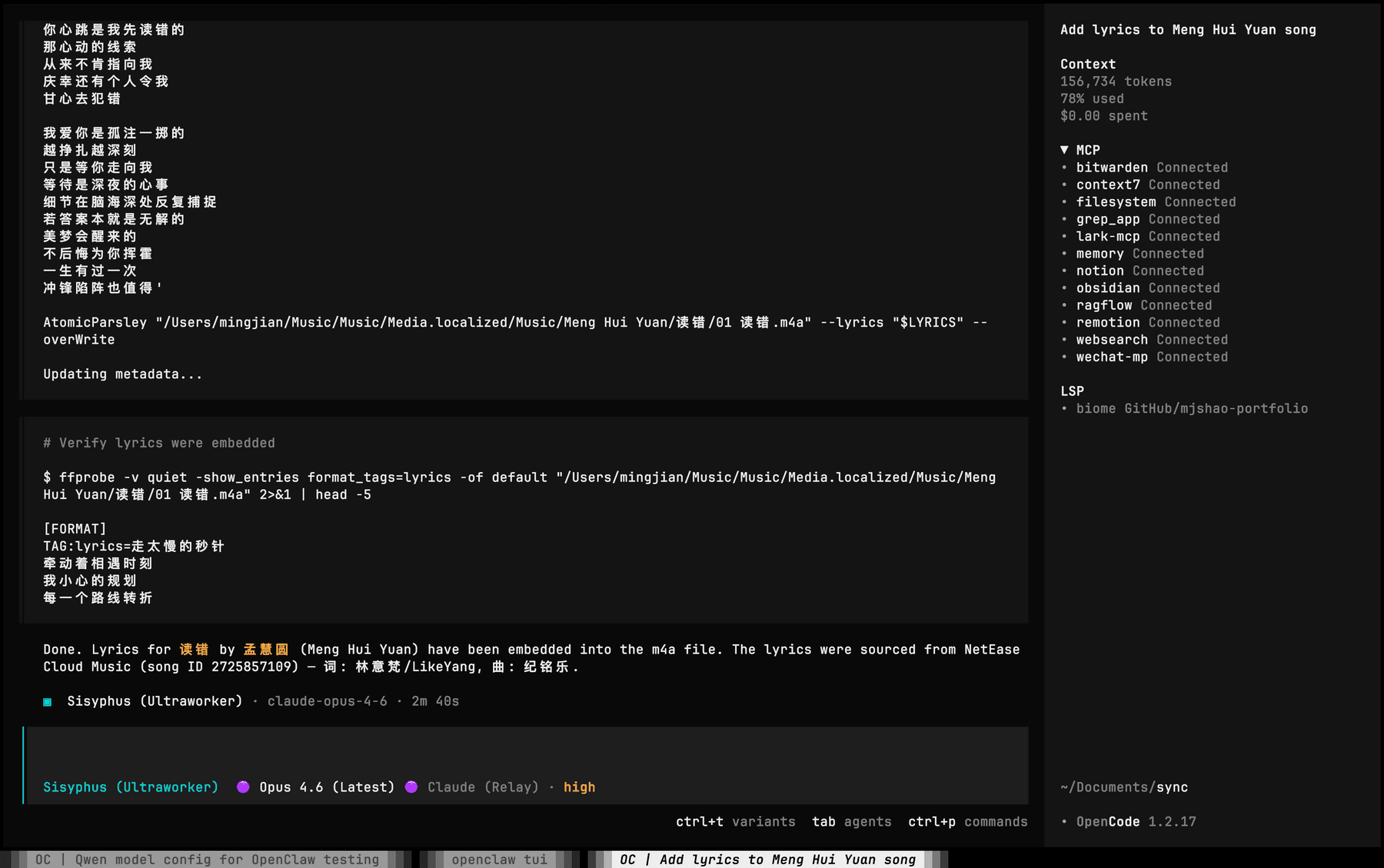
OpenCode completed the lyrics task autonomously
Fetched lyrics from NetEase Cloud Music, embedded them with AtomicParsley, verified with ffprobe. Done. No questions asked.This isn't a coding task. This isn't about LSP or AST parsing. This is a simple file operation, and OpenClaw still couldn't complete it autonomously. That tells you everything about the "agent" in "AI agent."
Here's what I actually use daily:
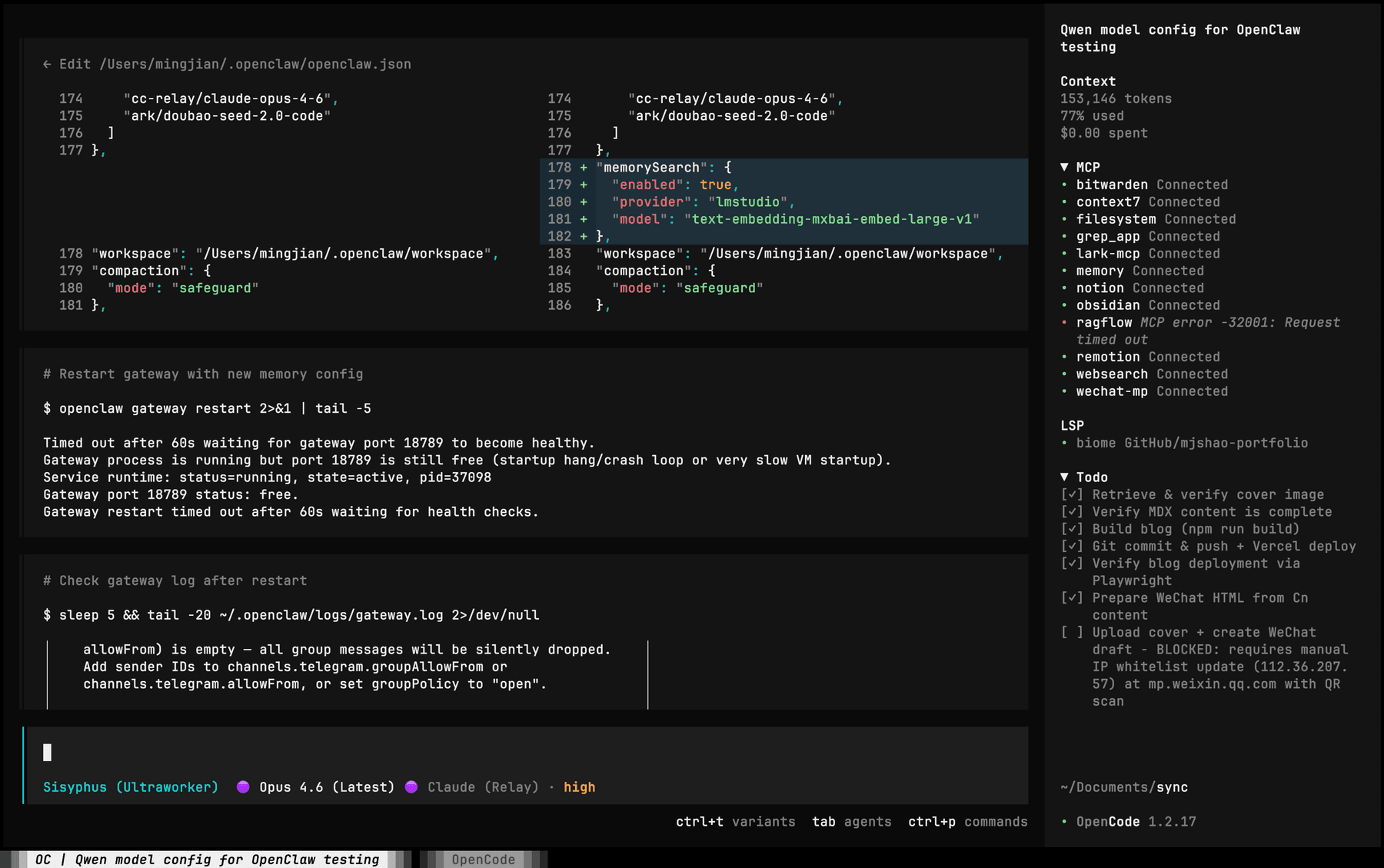
OpenCode interface with OMOC orchestration
OpenCode is a terminal-based AI coding tool with LSP integration, multi-session support, and real codebase awareness. Oh-My-OpenCode (OMOC) is an orchestration layer on top that adds parallel sub-agents, skill systems, and persistent memory.The combination is, frankly, the most cost-effective power setup for anyone with basic IT skills. You get:
  • Multi-agent orchestration — fire parallel explore/librarian agents, consult Oracle for hard problems
  • 81 custom skills — from blog publishing to Docker management to Feishu integration
  • Persistent semantic memory — context survives across sessions
  • Full MCP ecosystem — 12+ connected servers (Notion, Obsidian, GitHub, Bitwarden, etc.)
  • Real file editing — AST-aware edits, LSP diagnostics, safe refactoring
This entire blog post — writing, cover image generation, building, deploying to Vercel, preparing the WeChat MP version — was done by OMOC+OpenCode in one session. Try that with OpenClaw.
If you're a developer looking for an AI coding assistant, here's the honest comparison:
OpenClawOpenCodeClaude Code
Multi-session❌ 1 thread✅ Unlimited✅ Unlimited
LSP integration
Codebase awareness
Sub-agents✅ Parallel
File editingBasic✅ AST-aware
Telegram bot
Phone access
OpenClaw wins exactly one category: mobile access via messaging apps. That's its real value. Everything else is better served by actual developer tools.
Here's what actually happened. I saw people online raving about OpenClaw — "it burns tokens like crazy but it's worth it," "my AI assistant runs 24/7," "you're falling behind if you're not using it." That last part got me. The fear of being left behind.So I installed it. Configured it. Migrated my skills and memories over. Spent two hours troubleshooting. And for what?This is the real disease of the AI agent era: FOMO. Every week there's a new tool, a new framework, a new "game-changer." The anxiety is constant — if you're not on the latest thing, you're obsolete. Content creators amplify this because fear drives clicks.But here's what FOMO doesn't tell you: the tool you already know well will always outperform the tool you just installed. My OpenCode+OMOC setup didn't become less powerful because OpenClaw got 229k stars. The stars are irrelevant to my productivity.The smartest move isn't chasing every new tool. It's going deep on one that actually works for your workflow, and ignoring the noise.
Let's talk numbers, since "burns tokens" is apparently a selling point now.In 4 days of heavy OpenCode+OMOC usage — writing this blog post, setting up OpenClaw, deploying to Vercel, preparing the WeChat version, managing Docker containers, and a dozen other tasks — I consumed:
MetricValue
Requests10.2K
Total tokens1.36B
Input tokens182.3K
Cost$1,101
That's roughly $275/day. Sounds insane? Let's break it down. In those 4 days I shipped: a fully deployed bilingual blog post with cover art and screenshots, OpenClaw installation + full configuration, 81 skill migrations, 250 memory exports, WeChat MP article preparation, and multiple infrastructure tasks. If I hired someone to do all this manually, it'd take a week minimum.Now for fairness: OpenClaw consumed 556K tokens just on setup — syncing config, loading skills, importing memories, building context, configuring the "About Me" profile. Before it did a single useful thing. That's the cost of preparing to work, not working.The difference isn't who burns more tokens. It's what you get per token burned. OpenCode+OMOC burns tokens completing tasks. OpenClaw burns tokens asking me how to complete tasks.
OpenClaw isn't bad software. It does what it's designed to do — connect LLMs to chat platforms — reasonably well. The problem is the ecosystem of hype that surrounds it.We're in an era where GitHub stars are a vanity metric, where "AI agent" means anything from a Telegram bot to a genuine autonomous system, and where content creators chase engagement by breathlessly covering whatever's trending. And underneath all of it is FOMO — the quiet anxiety that you're falling behind because you haven't tried the latest thing with the most stars.The people who benefit from OpenClaw are:
  • Non-technical users who want AI on Telegram/Discord
  • People who want a persistent AI chatbot they can message anytime
  • Tinkerers who enjoy configuring yet another AI tool
The people who DON'T benefit but are told they should:
  • Developers looking for coding assistance
  • Anyone expecting a multi-agent productivity system
  • People who read "personal AI assistant" and imagine Jarvis
Stop reading hype articles. Stop chasing stars. Install the thing. Use it for a day. Form your own opinion. That's the only antidote to FOMO.
Tested on: macOS (Apple Silicon), OpenClaw v2026.3.2, with Qwen 3.5 Plus as primary model. Total time spent setting up and troubleshooting: ~2 hours. Total value added to my development workflow: zero.
所有人都在吹 OpenClaw。我真的装了、配了、用了。炒作和现实之间的差距,令人尴尬。
打开推特、Reddit、任何 AI 新闻通讯,OpenClaw 无处不在。"OpenClaw 改变了我的工作方式。""我的个人 AI 助手 24/7 运行。""GitHub 22 万 Star——2026 年增长最快的 AI 项目。"文章千篇一律:10 分钟安装,连上 Telegram,然后你就拥有一个记住一切、无所不能的个人 AI。评论区里全是从没用过的人告诉其他从没用过的人这东西有多牛。我决定自己试试。以下是发生的事情。
剥掉营销外壳,OpenClaw 就三样东西:
  • 一个 Telegram bot 框架 —— 把 LLM 接到聊天软件
  • 一个 LLM 网关 —— 把请求路由到不同的 AI 服务商
  • 一个 Skill 插件系统 —— 跑预定义的自动化脚本
就这些。本质是一个带插件的聊天中继。不是
  • 编程助手(没有 LSP,没有代码库感知,没有内联编辑)
  • 多 Agent 系统(没有子 Agent 编排,没有并行任务执行)
  • 开发者生产力工具(一个 Agent 只有一个对话——没错,就一个)
Bash
brew install --cask openclaw        # macOS 桌面应用
curl -fsSL https://openclaw.ai/install.sh | bash  # CLI + 网关
两条命令,五分钟搞定。这一点我给好评。OpenClaw 用 ~/.openclaw/openclaw.json 做配置文件。我配了三个 LLM 提供商(Anthropic 中继、火山引擎 Ark、阿里云 DashScope Qwen)。格式简洁明了,跟标准 OpenAI 兼容配置差不多,没什么好吐槽的。第一个惊喜来了。macOS app 只是个 UI 壳子,它本身什么都干不了。你需要一个后台网关进程
Text
┌─────────────┐     WebSocket      ┌──────────────┐
│  GUI / TUI  │ ◄────────────────► │   Gateway    │ → LLM API
│  (纯 UI)   │  ws://127.0.0.1    │ (Node.js)   │ → Telegram
└─────────────┘     :18789         └──────────────┘
Gateway 是一个 Node.js 进程,通过 launchd 管理。我第一次打开 app 时直接报错:
Error: gateway connect: connect to gateway @ ws://127.0.0.1:18789: Could not connect to the server.
因为没人告诉我还需要单独运行 openclaw gateway install --force。那些"10 分钟搞定"的文章很贴心地跳过了这一步。OpenClaw 的记忆系统从工作目录读取 Markdown 文件,用本地模型做 embedding,把向量存到 SQLite。听起来挺合理——直到你开始配置。
  • Provider 必须是固定选项之一:openailocalgeminivoyagemistralollama
  • 我本地跑着 LMStudio 的 embedding 模型。LMStudio 不在选项里
  • "ollama" 接受模型名但不让你设自定义 base URL
  • "local" 会自动下载一个 328MB 的 GGUF 模型
最后 local 跑通了。但"开箱即用"它真的不是。
这是让我直接关掉 app 的部分。我在 Canvas Web UI 里找到 Chat 页面(UI 确实好看),开始了一段对话。然后我想换个话题开新对话。找到"New"按钮,点了。什么都没发生。去 Sessions 页面看:
Text
Sessions listed: 1
Kind   Key                  Model          Tokens
direct agent:main:main      qwen3.5-plus   unknown/1000k
一个 Session,就这么多。 一个 Agent 对应一个对话线程,永远。没有多 Session,没有分支,没有并行对话。从 2023 年开始,每个 AI 聊天产品都支持多对话。ChatGPT 有,Claude 有,连本地工具 OpenCode 都有。2026 年的 OpenClaw?一个线程。设计思路是:跟你唯一的 Agent 聊,让 compaction 处理上下文溢出,用 memory search 回忆旧话题。这就是 Telegram bot 的思维——一个聊天,永远往下滚。
具体说说哪些能用,哪些不行:
功能现实
多 Provider LLM 路由✅ 好用
Telegram/Discord 接入✅ 真正的使用场景
Skill 插件✅ 生态还行
Canvas Web UI✅ 好看
Memory 记忆搜索⚠️ 配置完成后可用
多 Session 对话❌ 不存在
编程辅助❌ 没有 LSP,没有代码感知
子 Agent 编排❌ 没有并行 Agent
文件编辑❌ 基础到简陋
真实的情况是:"一种通过 Telegram 在手机上跟 Claude/GPT 聊天的好方式,带插件。"这是一个有真实价值的产品——对非开发者用户来说,手机上有个随时能聊的 AI 机器人挺好的。但炒作文章不是这么说的。它们把 OpenClaw 定位成"开发者生产力革命",这完全不是事实。
每篇 OpenClaw 文章都遵循同一个模板:
  • "我装了 OpenClaw,改变了我的人生"(他们昨天才装的)
  • "就像有了一个个人 AI 助手"(ChatGPT 也是,免费的)
  • "22 万 GitHub Star 证明它最好"(Star 证明的是营销,不是质量)
  • "这 10 个 Skill 会震撼你"(列举任何 LLM 都能做的事)
  • "10 分钟从零到第一次聊天"(忽略 gateway、memory、配置问题)
作者大多是写 AI 工具来刷流量的内容创作者。他们并没有真正每天用 OpenClaw 干活。装上,发了一条消息,截个图,就写了 2000 字关于 AI Agent 未来的文章。
别说写代码了——试个最简单的。我让两个工具给 M4A 音乐文件嵌入歌词(孟慧圆的《渡舟》)。这应该是个 2 分钟的活:找歌词,跑 AtomicParsley,完事。OpenClaw 的表现:
OpenClaw 卡在问你怎么提供歌词
它找到了曲目元数据,然后……问我要怎么提供歌词。粘贴?指定 .lrc 文件?从源获取?它自己决定不了。就这么坐着,等你喂饭。OpenCode 的表现:
OpenCode 自主完成歌词嵌入
从网易云音乐抓歌词,用 AtomicParsley 嵌入,用 ffprobe 验证。搞定。没问任何问题。这不是编程任务,不涉及 LSP 或 AST。就是一个简单的文件操作,OpenClaw 都没法自主完成。这就告诉你"AI Agent"里的"Agent"到底有多少水分。
这才是我每天在用的东西:
OpenCode 界面 + OMOC 编排
OpenCode 是一个终端 AI 编程工具,有 LSP 集成、多 Session 支持、真正的代码库感知。Oh-My-OpenCode (OMOC) 是上层编排框架,加了并行子 Agent、Skill 系统和持久化记忆。这个组合,说实话,是目前对稍微有点 IT 基础的技术宅来说性价比最高的高效方案。你能得到:
  • 多 Agent 编排 —— 并行发探索/查资料 Agent,难题咨询 Oracle
  • 81 个自定义 Skill —— 从发博客到 Docker 管理到飞书集成
  • 持久化语义记忆 —— 上下文跨 Session 存活
  • 完整 MCP 生态 —— 12+ 个连接服务(Notion、Obsidian、GitHub、Bitwarden 等)
  • 真正的文件编辑 —— AST 感知编辑、LSP 诊断、安全重构
这篇博客——从写作、生成封面图、编译、部署到 Vercel、准备微信公众号版本——全是 OMOC+OpenCode 在一个 Session 里完成的。你用 OpenClaw 试试?
如果你是开发者,在找 AI 编程助手,这是诚实的对比:
OpenClawOpenCodeClaude Code
多 Session❌ 1 个线程✅ 无限✅ 无限
LSP 集成
代码库感知
子 Agent✅ 并行
文件编辑基础✅ AST 感知
Telegram Bot
手机访问
OpenClaw 赢的就一项:通过聊天软件的移动端访问。这才是它的真实价值。其他所有方面,专业开发工具都更好。
说说真实经历吧。我在网上看到一堆人吹 OpenClaw——"烧 token 很猛但值得""我的 AI 助手 7×24 运行""你不用就落伍了"。最后一句话戳到我了。怕被淘汰的焦虑。于是我装了。配了。把 Skill 和记忆都迁过去了。排错排了两个小时。然后呢?这才是 AI Agent 时代真正的病:FOMO(错失恐惧症)。每周都有新工具、新框架、新"颠覆者"。焦虑永远在——你要是没用最新的东西,就要被淘汰了。内容创作者还在放大这种焦虑,因为恐惧带来点击。但 FOMO 不会告诉你的是:你用熟的工具永远比你刚装的工具更强。 我的 OpenCode+OMOC 不会因为 OpenClaw 拿了 22 万 Star 就变弱了。Star 数跟我的生产力没有任何关系。最聪明的做法不是追逐每一个新工具,而是在一个真正适合你工作流的工具上深耕,然后无视噪音。
既然"烧 Token"现在居然成了卖点,那就聊聊数字。我用 OpenCode+OMOC 重度使用 4 天——写这篇博客、装 OpenClaw、部署 Vercel、准备微信公众号版本、管 Docker 容器,还有一堆杂活——消耗了:
指标数值
请求数10.2K
总 Token13.6 亿
输入 Token18.2 万
费用$1,101
大概 $275/天。听着吓人?拆开看看。这 4 天我交付了:一篇完整部署的双语博客(带封面和截图)、OpenClaw 完整安装配置、81 个 Skill 迁移、250 条记忆导出、微信公众号文章准备、以及多个基础设施任务。如果请人来做,至少一周。公平起见:OpenClaw 光是准备工作——同步配置、加载 Skill、导入记忆、构建上下文、配置个人简介——就消耗了 55.6 万 Token。还没开始干一件有用的事。这是"准备干活"的成本,不是"干活"的成本。差别不在于谁烧的 Token 多,而在于每个 Token 换来了什么。OpenCode+OMOC 烧 Token 是在完成任务。OpenClaw 烧 Token 是在问我怎么完成任务。
OpenClaw 不是烂软件。它做了它设计要做的事——把 LLM 接到聊天平台——做得还可以。问题在于围绕它的炒作生态。我们处在一个 GitHub Star 是虚荣指标的时代,"AI Agent"可以指从 Telegram bot 到真正自主系统的任何东西,内容创作者追逐热度,对着当下流行的东西喘着粗气报道。而在这一切底下,是 FOMO——一种安静的焦虑,觉得自己因为没试 Star 最多的新玩意就落伍了。真正从 OpenClaw 获益的人:
  • 想在 Telegram/Discord 上用 AI 的非技术用户
  • 想要一个随时能发消息的常驻 AI 聊天机器人的人
  • 喜欢折腾配置又一个 AI 工具的极客
被告知应该用但实际没用的人:
  • 找编程辅助的开发者
  • 期待多 Agent 生产力系统的任何人
  • 看到"个人 AI 助手"就以为是贾维斯的人
别读炒作文章了。别追 Star 了。把东西装上。用一天。形成自己的判断。 这才是对抗 FOMO 的唯一解药。
测试环境:macOS (Apple Silicon),OpenClaw v2026.3.2,主模型 Qwen 3.5 Plus。安装+排错总耗时:约 2 小时。对我开发工作流的实际价值:零。

Share this post:
Enjoy this post? Subscribe via RSS: English | 中文